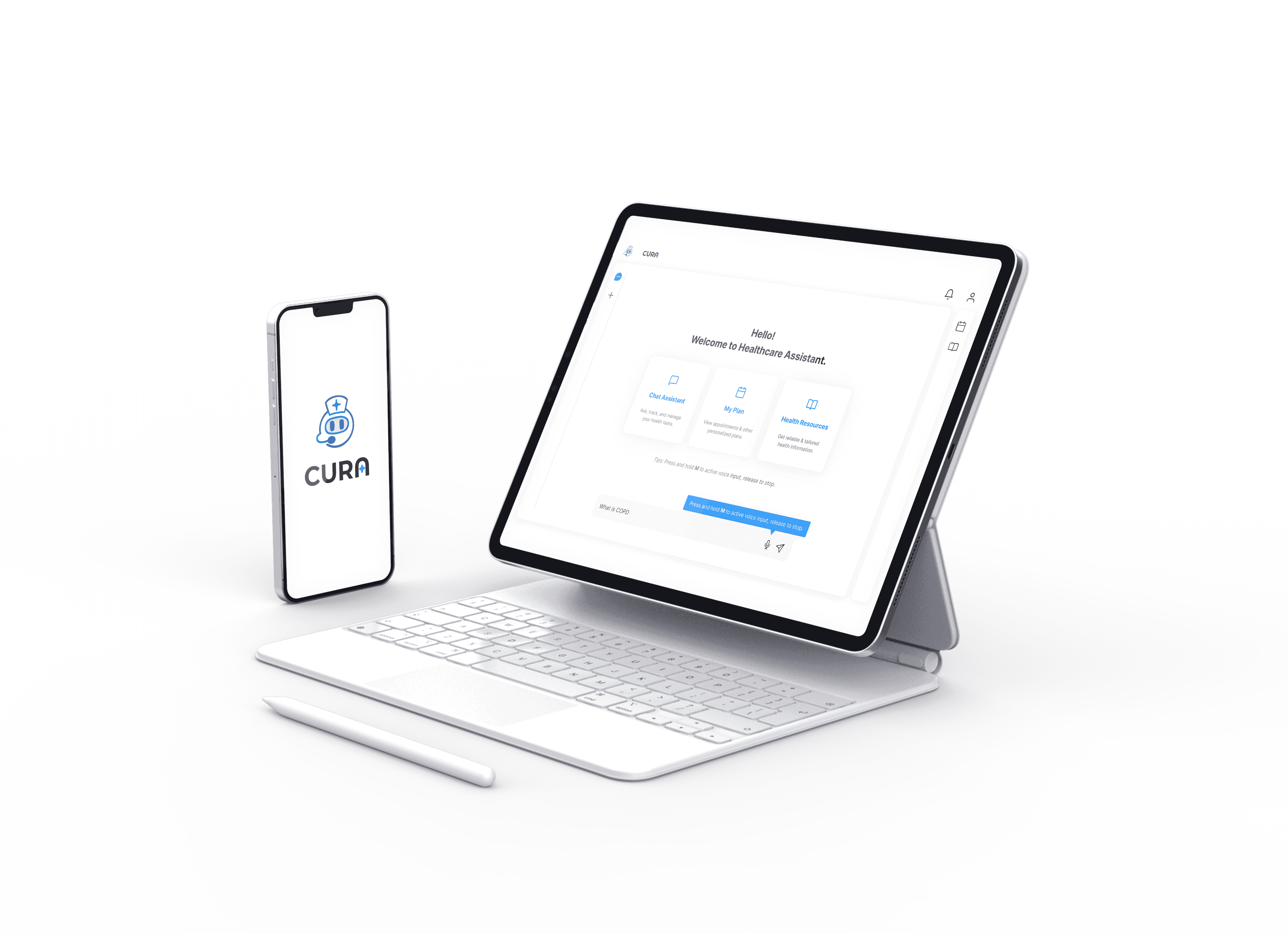


CURA - AI Health Companion for Chronic Disease Management
CURA is a voice-friendly AI health companion for elderly chronic disease patients. It was built in partnership with Providence Health Care, UBC's Skunkworks Lab, and Providence Research. Providence serves over 1.5 million patients in BC annually. The project's goal was to turn fragmented care routines into something accessible and conversational.
I was the end-to-end designer on the project: responsible for research, interaction design, visual UI, and the final design system. Two rounds of usability testing with 34 participants shaped the final product. We delivered 50+ design assets and a WCAG AA-compliant design system ready for engineering handoff.


My Role: Product Designer & UX Researcher
As a Product Designer & UX Researcher, I was the primary advocate for the user within a high-speed, cross-functional team of 7.
End-to-End Research: Owned the evaluative research strategy, conducting 2 major rounds of usability testing with 15+ senior participants and medical professionals.
Conceptualized and designed the Agent-lite interaction model, translating LLM capabilities into a usable UX pattern.
Established a WCAG AA-compliant design system tailored for elderly chronic patients, focusing on cognitive load reduction and visual accessibility.
Collaborated with developers, medical professionals, and researchers across sprint reviews
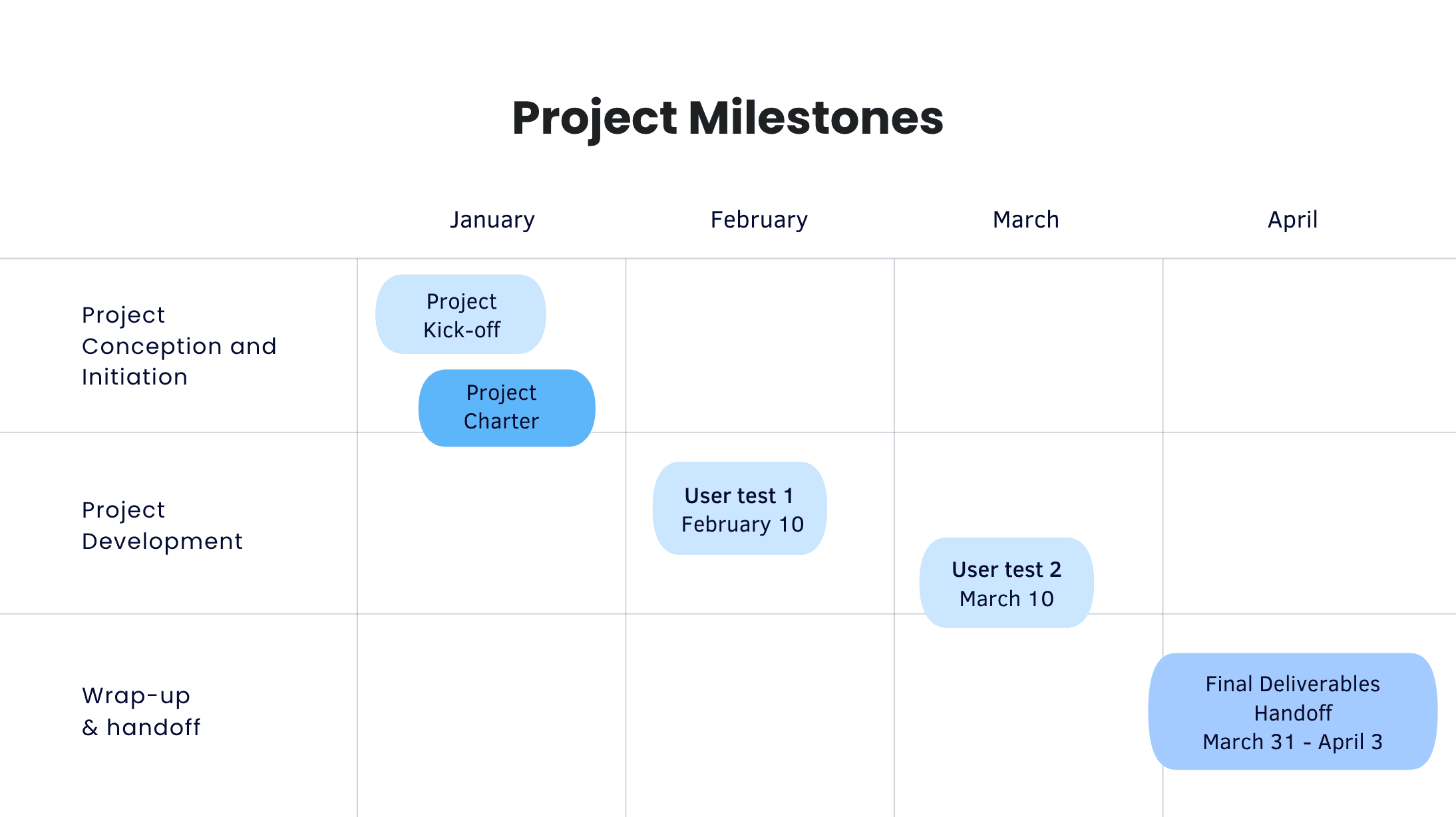
Waterfall planning + Agile sprints
We operated under a "Watergile" framework across a 12-week intensive sprint.
Phase 1: Inception: Rapid discovery, RACI alignment, and stakeholder interviews.
Phase 2: Pivot & Prototype: Iterative design cycles triggered by real-world user failures.
Phase 3: Validation & Handoff: Final documentation, technical API specs, and a high-fidelity functional prototype delivered to Providence Health.
The Challenge: Dissolving the Digital Wall
Framer is a design tool that allows you to design websites on a freeform canvas, and then publish them as websites with a single click.
Impact
Eliminated Navigation Complexity
Introduced Agent-lite, reducing manual operations by ~80%
Built Trust Through Transparency
Real-time feedback and flexible editing ensuring AI accuracy
Accessibility as Foundation
WCAG AA compliance + zero readability complaints + 4.0/5 voice accuracy
Maintained Quality Under Complexity
3.8/5 medication satisfaction despite 2-3x task difficulty increase
Outcome
Self-trained Agent-lite System
Conversational intent recognition
2 Rounds
Usability testing iterations
34 Testers
Feedback inputs across research phases
50+ Assets
Design deliverables
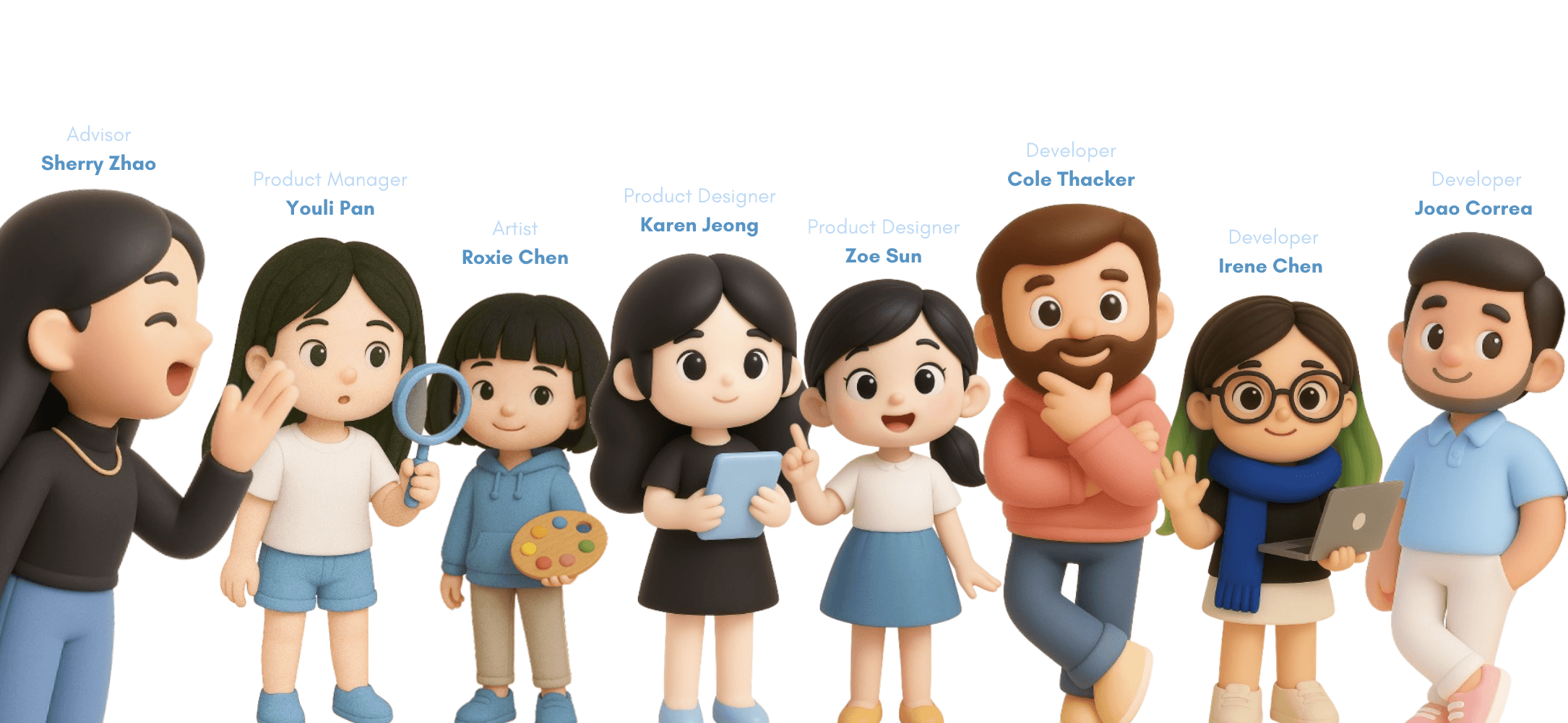
Generated by our genius PM Youli :P
CURA - AI Health Companion for Chronic Disease Management
CURA is a voice-friendly AI health companion for elderly chronic disease patients. It was built in partnership with Providence Health Care, UBC's Skunkworks Lab, and Providence Research. Providence serves over 1.5 million patients in BC annually. The project's goal was to turn fragmented care routines into something accessible and conversational.
I was the end-to-end designer on the project: responsible for research, interaction design, visual UI, and the final design system. Two rounds of usability testing with 34 participants shaped the final product. We delivered 50+ design assets and a WCAG AA-compliant design system ready for engineering handoff.
My Role: Product Designer & UX Researcher
As a Product Designer & UX Researcher, I was the primary advocate for the user within a high-speed, cross-functional team of 7.
End-to-End Research: Owned the evaluative research strategy, conducting 2 major rounds of usability testing with 15+ senior participants and medical professionals.
Conceptualized and designed the Agent-lite interaction model, translating LLM capabilities into a usable UX pattern.
Established a WCAG AA-compliant design system tailored for elderly chronic patients, focusing on cognitive load reduction and visual accessibility.
Collaborated with developers, medical professionals, and researchers across sprint reviews
Waterfall planning + Agile sprints
We operated under a "Watergile" framework across a 12-week intensive sprint.
Phase 1: Inception: Rapid discovery, RACI alignment, and stakeholder interviews.
Phase 2: Pivot & Prototype: Iterative design cycles triggered by real-world user failures.
Phase 3: Validation & Handoff: Final documentation, technical API specs, and a high-fidelity functional prototype delivered to Providence Health.
The Challenge: Dissolving the Digital Wall
Framer is a design tool that allows you to design websites on a freeform canvas, and then publish them as websites with a single click.
Impact
Eliminated Navigation Complexity
Introduced Agent-lite, reducing manual operations by ~80%
Built Trust Through Transparency
Real-time feedback and flexible editing ensuring AI accuracy
Accessibility as Foundation
WCAG AA compliance + zero readability complaints + 4.0/5 voice accuracy
Maintained Quality Under Complexity
3.8/5 medication satisfaction despite 2-3x task difficulty increase
Outcome
Self-trained Agent-lite System
Conversational intent recognition
2 Rounds
Usability testing iterations
34 Testers
Feedback inputs across research phases
50+ Assets
Design deliverables
Generated by our genius PM Youli :P
The Industry Moment: AI Enters Healthcare
Framer is a design tool that allows you to design websites on a freeform canvas, and then publish them as websites with a single click.
Chronic Crisis
45% of Canadians live with chronic disease
Chronic Crisis
45% of Canadians live with chronic disease
Aging Challenge
73% are aged 65+
Aging Challenge
73% are aged 65+
Rising Demand
Chronic care costs $190 billion annually
Rising Demand
Chronic care costs $190 billion annually
System Pressure
70% of direct healthcare spending
System Pressure
70% of direct healthcare spending
The Clients' Vision
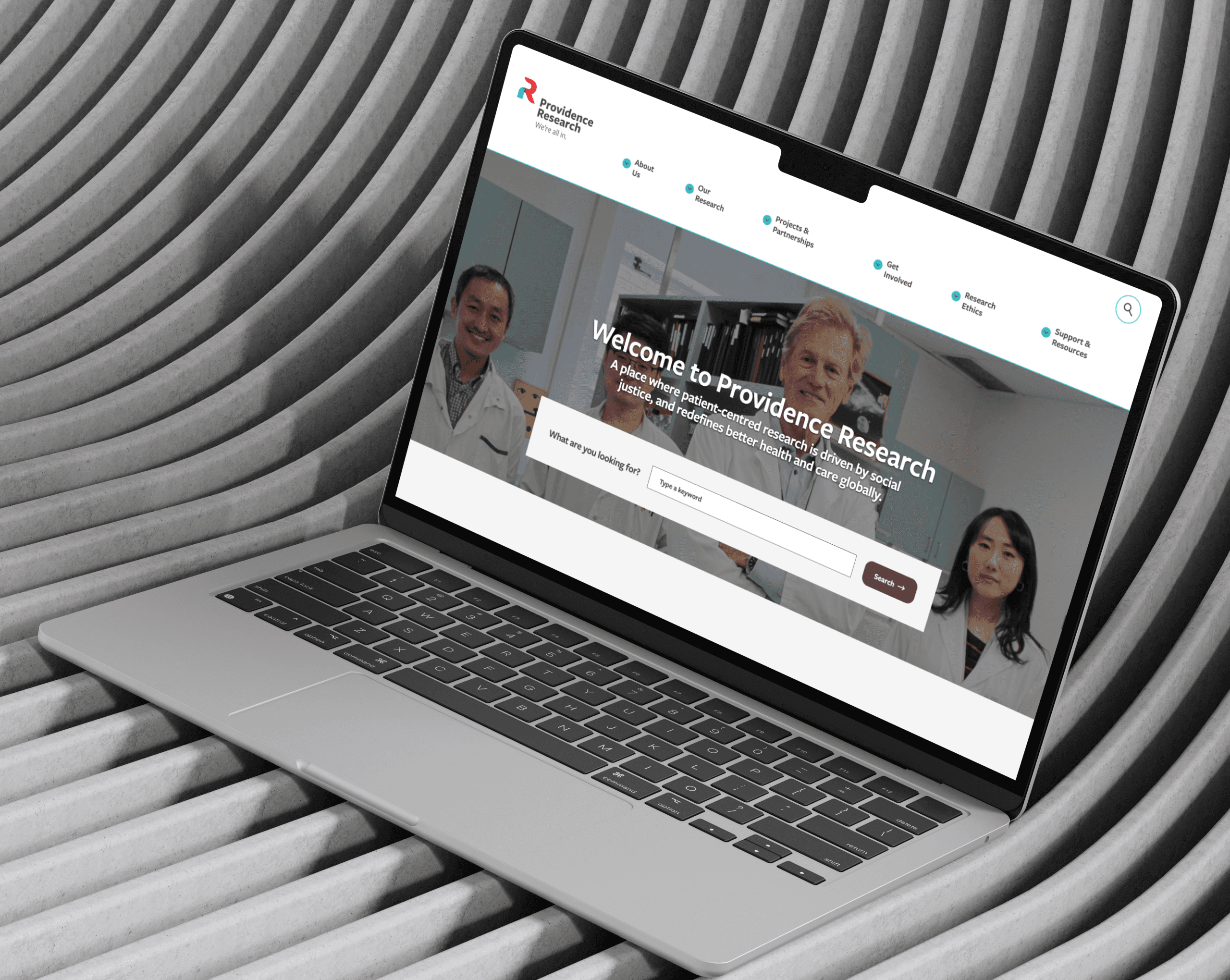
Providence Health Care serves 1.5M+ patients annually across British Columbia. Their system faces constant pressure from appointment overload, diverse populations, limited clinical time, and fragmented care.
Framer is a design tool that allows you to design websites on a freeform canvas, and then publish them as websites with a single click.
Their vision is an AI-powered health companion empowering patients to manage conditions independently, reducing burden on the healthcare system.
Framer is a design tool that allows you to design websites on a freeform canvas, and then publish them as websites with a single click.
The Industry Moment: AI Enters Healthcare
Framer is a design tool that allows you to design websites on a freeform canvas, and then publish them as websites with a single click.
Chronic Crisis
45% of Canadians live with chronic disease
Aging Challenge
73% are aged 65+
Rising Demand
Chronic care costs $190 billion annually
System Pressure
70% of direct healthcare spending
The Clients' Vision
Providence Health Care serves 1.5M+ patients annually across British Columbia. Their system faces constant pressure from appointment overload, diverse populations, limited clinical time, and fragmented care.
Framer is a design tool that allows you to design websites on a freeform canvas, and then publish them as websites with a single click.
Their vision is an AI-powered health companion empowering patients to manage conditions independently, reducing burden on the healthcare system.
Framer is a design tool that allows you to design websites on a freeform canvas, and then publish them as websites with a single click.
We began our discovery by investigating why current digital health solutions fail to gain traction among seniors with chronic conditions. Our research combined broad market analysis with deep qualitative dives to uncover the "Digital Wall" that prevents patients from managing their care effectively at home.
Research Scope
Rigor and Empathy
To build a foundation of truth. We engaged with both the providers of care and those receiving it.
In-Depth Stakeholder Interviews
We interviewed 4 patients with chronic disease (managing COPD and cardiovascular issues, etc.), alongside nursing professionals from Providence Health.
Secondary Market Analysis
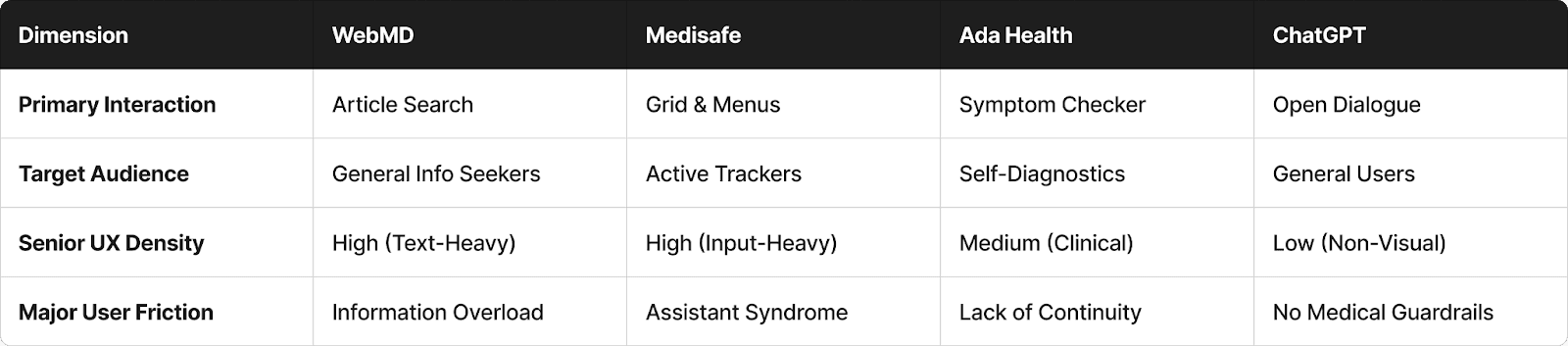
We audited the leading health platforms used by seniors to identify patterns of failure.
Survey
Conducted a survey with 30+ chronic disease patients to quantify the scale of digital literacy barriers and prevalent technology anxiety.
Literature Review
We analyzed clinical studies regarding patient memory retention and cognitive decline in digital environments.
Competitive Landscape
We analyzed the current market to understand why existing solutions fail our target demographic. Most apps prioritize data collection for healthy adults rather than accessible management for seniors.

The Opportunity
Designing for Digital Fragility
Our interviews revealed that the barrier to care is a lack of human-centered experience.
Framer is a design tool that allows you to design websites on a freeform canvas, and then publish them as websites with a single click.
Defining the Digitally Fragile
Our focus crystallized on the "Digitally Fragile" senior. These are individuals who manage complex conditions like COPD but possess low digital literacy. They require technology that feels human and acts as a supportive co-pilot.
Through in-depth interviews and secondary research, we uncovered a critical paradox: High medical need vs. Low digital confidence.
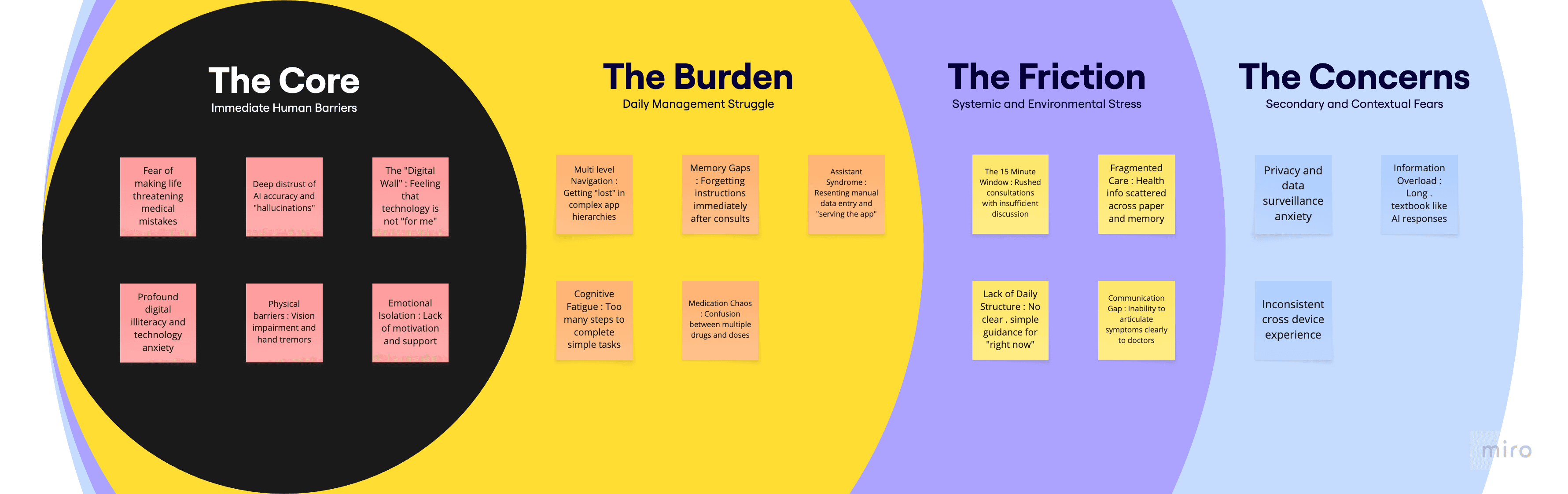
Our target users weren't just skeptical of AI. Many were struggling with the basic premise of digital health tools.
The Conflict
Client's Ambition vs. Patient Reality
Research revealed a fundamental misalignment: Providence envisioned AI offloading routine health management from overwhelmed clinicians to empowered patients. But our target users weren't seeking empowerment through technology. They wanted relief from it.
The healthcare system needed patients to become more self-sufficient through digital tools. Patients needed technology simple enough that managing chronic disease didn't feel like learning a new job.
Client‘s Vision
Reducing System Burden
Providence envisioned an AI companion enabling patients to manage health independently, freeing doctors to focus on complex cases requiring human expertise.
How might we build sophisticated AI features that integrate data, generate insights, and provide intelligent recommendations?
Framer is a design tool that allows you to design websites on a freeform canvas, and then publish them as websites with a single click.


User Reality
Removing Digital Barriers
Elderly patients face physical limitations, cognitive overload, and technology anxiety. They need health management simplified through conversation, not complicated by digital interfaces.
How might we make any of this usable for people with low digital literacy, visual impairments, and technology anxiety?
Framer is a design tool that allows you to design websites on a freeform canvas, and then publish them as websites with a single click.
We began our discovery by investigating why current digital health solutions fail to gain traction among seniors with chronic conditions. Our research combined broad market analysis with deep qualitative dives to uncover the "Digital Wall" that prevents patients from managing their care effectively at home.
Research Scope
Rigor and Empathy
To build a foundation of truth. We engaged with both the providers of care and those receiving it.
In-Depth Stakeholder Interviews
We interviewed 4 patients with chronic disease (managing COPD and cardiovascular issues, etc.), alongside nursing professionals from Providence Health.
Secondary Market Analysis
We audited the leading health platforms used by seniors to identify patterns of failure.
Survey
Conducted a survey with 30+ chronic disease patients to quantify the scale of digital literacy barriers and prevalent technology anxiety.
Literature Review
We analyzed clinical studies regarding patient memory retention and cognitive decline in digital environments.
Competitive Landscape
We analyzed the current market to understand why existing solutions fail our target demographic. Most apps prioritize data collection for healthy adults rather than accessible management for seniors.
The Opportunity
Designing for Digital Fragility
Our interviews revealed that the barrier to care is a lack of human-centered experience.
Framer is a design tool that allows you to design websites on a freeform canvas, and then publish them as websites with a single click.
Defining the Digitally Fragile
Our focus crystallized on the "Digitally Fragile" senior. These are individuals who manage complex conditions like COPD but possess low digital literacy. They require technology that feels human and acts as a supportive co-pilot.
Through in-depth interviews and secondary research, we uncovered a critical paradox: High medical need vs. Low digital confidence.
Our target users weren't just skeptical of AI. Many were struggling with the basic premise of digital health tools.
The Conflict
Client's Ambition vs. Patient Reality
Research revealed a fundamental misalignment: Providence envisioned AI offloading routine health management from overwhelmed clinicians to empowered patients. But our target users weren't seeking empowerment through technology. They wanted relief from it.
The healthcare system needed patients to become more self-sufficient through digital tools. Patients needed technology simple enough that managing chronic disease didn't feel like learning a new job.
Client‘s Vision
Reducing System Burden
Providence envisioned an AI companion enabling patients to manage health independently, freeing doctors to focus on complex cases requiring human expertise.
How might we build sophisticated AI features that integrate data, generate insights, and provide intelligent recommendations?
Framer is a design tool that allows you to design websites on a freeform canvas, and then publish them as websites with a single click.
User Reality
Removing Digital Barriers
Elderly patients face physical limitations, cognitive overload, and technology anxiety. They need health management simplified through conversation, not complicated by digital interfaces.
How might we make any of this usable for people with low digital literacy, visual impairments, and technology anxiety?
Framer is a design tool that allows you to design websites on a freeform canvas, and then publish them as websites with a single click.
Exploring Solutions
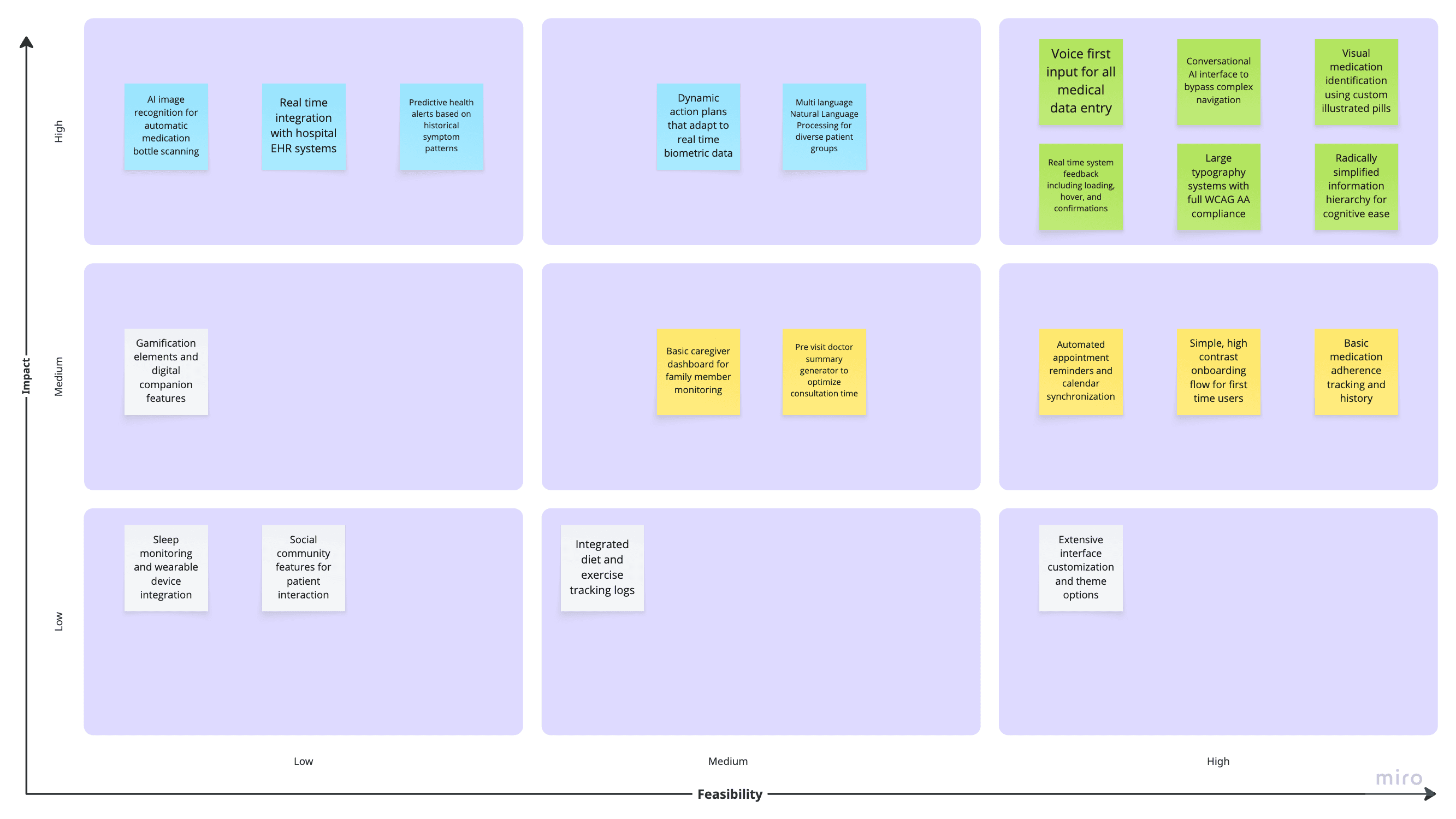
Based on user pain points, we ideated solutions across the impact/feasibility spectrum:
Aligning Priorities with Client
With the gap between AI ambition and user reality clearly defined, we presented research findings to Providence's Skunkworks team.
Framer is a design tool that allows you to design websites on a freeform canvas, and then publish them as websites with a single click.
Decision: Build a lean prototype validating conversational AI + basic health management before adding sophistication.
Strategic Trade-offs
With 12 weeks and high safety stakes, we made difficult decisions: cut AI image recognition for safety, delayed EHR integration for feasibility, and focused exclusively on medication and appointment management.
Delayed 1: Real-Time Hospital EHR Integration
Framer is a design tool that allows you to design websites on a freeform canvas, and then publish them as websites with a single click.
Delayed 2: AI Image Recognition for Medications
Framer is a design tool that allows you to design websites on a freeform canvas, and then publish them as websites with a single click.
Delayed 3: Comprehensive Lifestyle Monitoring
Framer is a design tool that allows you to design websites on a freeform canvas, and then publish them as websites with a single click.
Exploring Solutions
Based on user pain points, we ideated solutions across the impact/feasibility spectrum:
Aligning Priorities with Client
With the gap between AI ambition and user reality clearly defined, we presented research findings to Providence's Skunkworks team.
Framer is a design tool that allows you to design websites on a freeform canvas, and then publish them as websites with a single click.
Decision: Build a lean prototype validating conversational AI + basic health management before adding sophistication.
Strategic Trade-offs
With 12 weeks and high safety stakes, we made difficult decisions: cut AI image recognition for safety, delayed EHR integration for feasibility, and focused exclusively on medication and appointment management.
Delayed 1: Real-Time Hospital EHR Integration
Framer is a design tool that allows you to design websites on a freeform canvas, and then publish them as websites with a single click.
Delayed 2: AI Image Recognition for Medications
Framer is a design tool that allows you to design websites on a freeform canvas, and then publish them as websites with a single click.
Delayed 3: Comprehensive Lifestyle Monitoring
Framer is a design tool that allows you to design websites on a freeform canvas, and then publish them as websites with a single click.
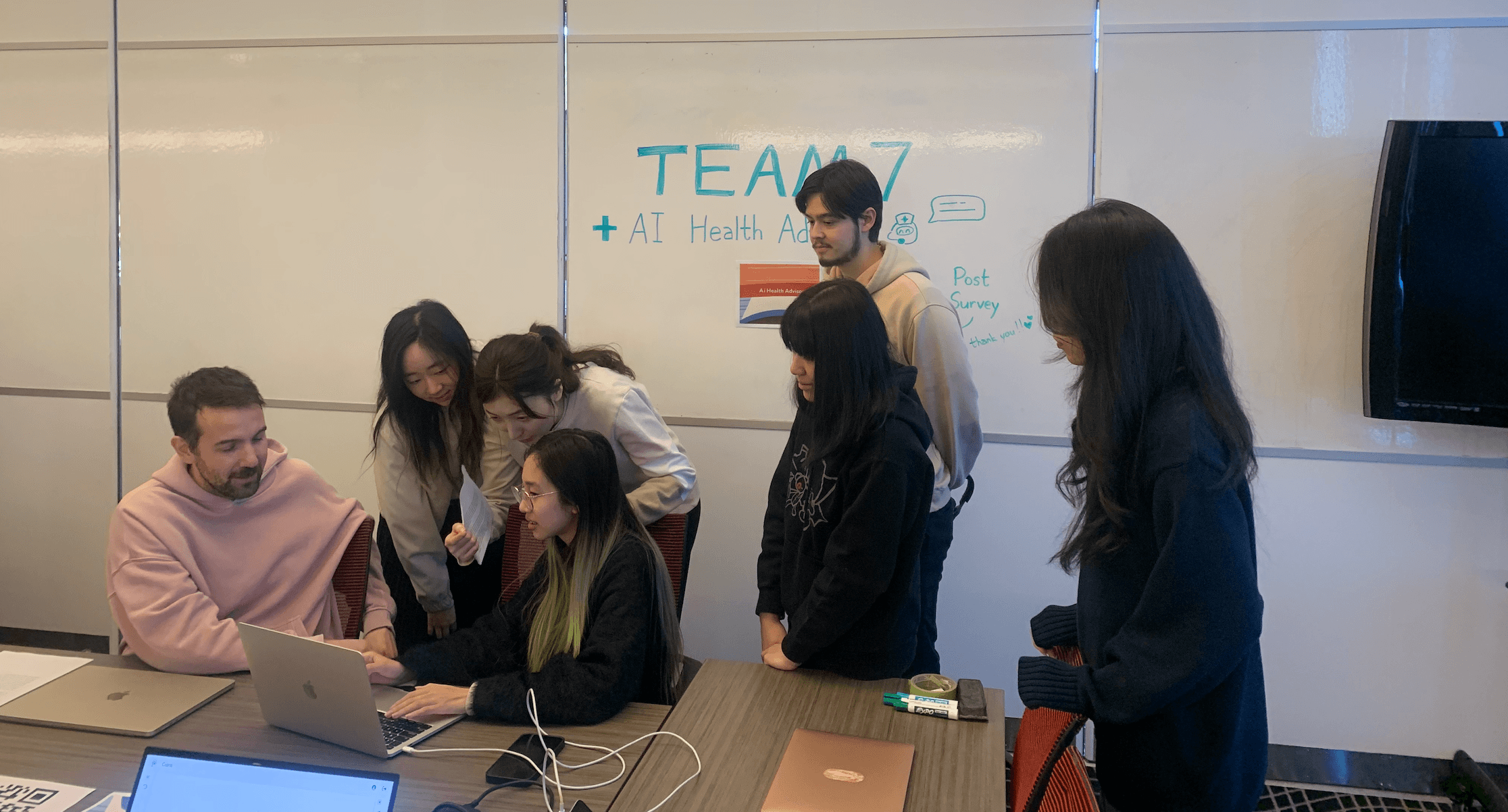
Date: February 10, 2025
Participants: 19 participants (4 seniors aged 65+, 15 adults aged 20-50)
Method: Moderated usability testing with think-aloud protocol
Tasks: Basic chat interaction, voice input trial, medication logging, appointment navigation
What We Kept
Voice Recognition Accuracy
Framer is a design tool that allows you to design websites on a freeform canvas, and then publish them as websites with a single click.
Voice Recognition Accuracy
Framer is a design tool that allows you to design websites on a freeform canvas, and then publish them as websites with a single click.
What We Fixed
Test 1 revealed three critical issues: interaction uncertainty, readability barriers, and navigation collapse.
🤔 The Feedback Void
Framer is a design tool that allows you to design websites on a freeform canvas, and then publish them as websites with a single click.
🧐 Readability Crisis
Framer is a design tool that allows you to design websites on a freeform canvas, and then publish them as websites with a single click.
😵💫 Navigation Collapse
Framer is a design tool that allows you to design websites on a freeform canvas, and then publish them as websites with a single click.
What We Changed
Voice Input: From Supplementary to Essential
Framer is a design tool that allows you to design websites on a freeform canvas, and then publish them as websites with a single click.
Navigation: Another Way?
Framer is a design tool that allows you to design websites on a freeform canvas, and then publish them as websites with a single click.
Our Pivot: From AI First to Accessibility First
Test 1 forced an immediate recalibration, maybe the system should handle the complexity invisibly. Instead of teaching users to navigate menus, we should let them simply talk about their needs. Instead of filling out forms, they should just describe their situation.
What We Paused
Framer is a design tool that allows you to design websites on a freeform canvas, and then publish them as websites with a single click.
What We Prioritized
Framer is a design tool that allows you to design websites on a freeform canvas, and then publish them as websites with a single click.
Date: February 10, 2025
Participants: 19 participants (4 seniors aged 65+, 15 adults aged 20-50)
Method: Moderated usability testing with think-aloud protocol
Tasks: Basic chat interaction, voice input trial, medication logging, appointment navigation
What We Kept
Voice Recognition Accuracy
Framer is a design tool that allows you to design websites on a freeform canvas, and then publish them as websites with a single click.
Voice Recognition Accuracy
Framer is a design tool that allows you to design websites on a freeform canvas, and then publish them as websites with a single click.
What We Fixed
Test 1 revealed three critical issues: interaction uncertainty, readability barriers, and navigation collapse.
🤔 The Feedback Void
Framer is a design tool that allows you to design websites on a freeform canvas, and then publish them as websites with a single click.
🧐 Readability Crisis
Framer is a design tool that allows you to design websites on a freeform canvas, and then publish them as websites with a single click.
😵💫 Navigation Collapse
Framer is a design tool that allows you to design websites on a freeform canvas, and then publish them as websites with a single click.
What We Changed
Voice Input: From Supplementary to Essential
Framer is a design tool that allows you to design websites on a freeform canvas, and then publish them as websites with a single click.
Navigation: Another Way?
Framer is a design tool that allows you to design websites on a freeform canvas, and then publish them as websites with a single click.
Our Pivot: From AI First to Accessibility First
Test 1 forced an immediate recalibration, maybe the system should handle the complexity invisibly. Instead of teaching users to navigate menus, we should let them simply talk about their needs. Instead of filling out forms, they should just describe their situation.
What We Paused
Framer is a design tool that allows you to design websites on a freeform canvas, and then publish them as websites with a single click.
What We Prioritized
Framer is a design tool that allows you to design websites on a freeform canvas, and then publish them as websites with a single click.
Test 1 revealed the real challenge. We kind of paused to make AI smarter, but making technology more accessible. We systematically addressed barriers through several core strategies.
Strategy 1
Agent-lite & Conversational Navigation
Test 1 revealed users may not need better navigation, maybe they could live without that.
The Problem
Multi-step workflows overwhelmed users. Even simplified, navigation created cognitive load.
The Solution
We turned to Agent-lite, a lightweight intent recognition system allowing users to accomplish tasks through natural language alone.
How it works
Framer is a design tool that allows you to design websites on a freeform canvas, and then publish them as websites with a single click.
Result
The limited scope meant higher accuracy. Users successfully completed 80% of conversational tasks without manual navigation.
Impact
Reduced approximately 80% of multi-step navigation. Users stopped asking "Where do I click?" and started describing what they needed.
Strategy 2
Visual System Overhaul
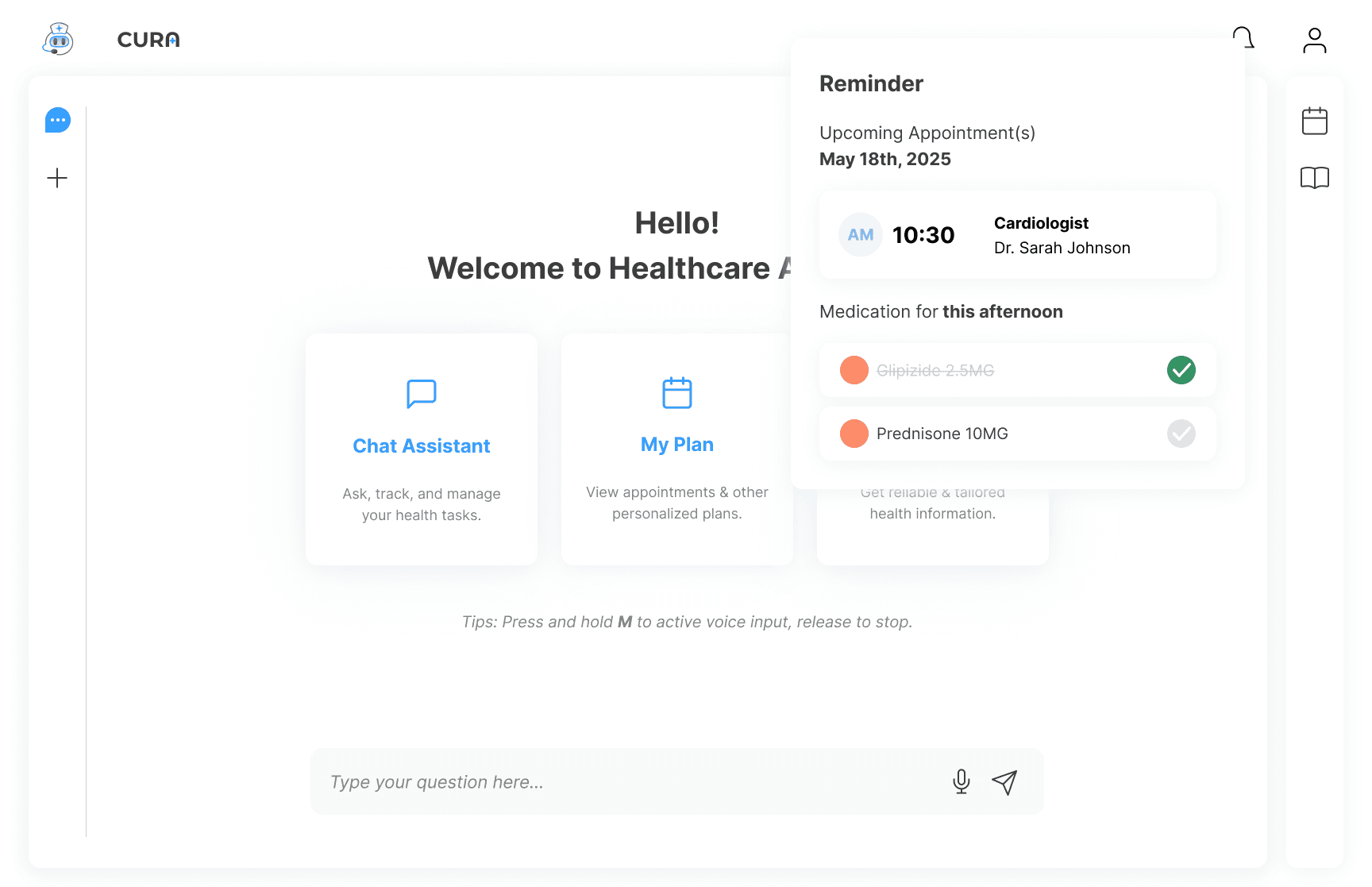
We overhauled typography and built a comprehensive visual feedback ecosystem, eliminating interaction uncertainty.
We initially followed standard typography guidelines and specifications. Based on feedback from Test 1, we realized that our users required greater customization. Our initial idea was to introduce adjustable text size settings, but due to development capacity constraints and the time required for implementation, we decided to prioritize a version optimized specifically for senior users.
Typography & Hierarchy
Increased base font size across all interfaces
Applied 1.5x minimum line height (previously 1.2x)
Broke long AI responses into bulleted sections with clear headers
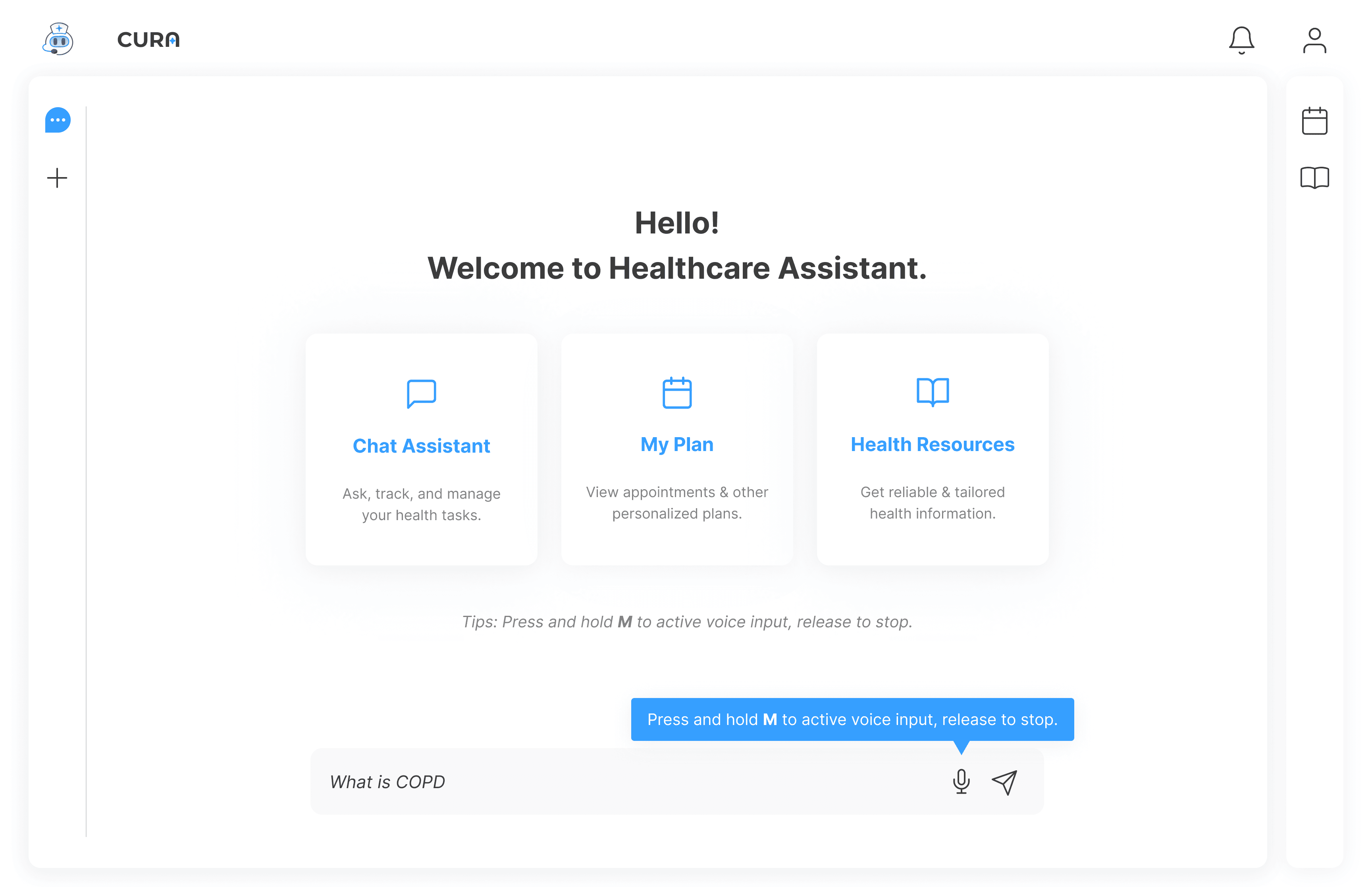
Feedback Ecosystem
Active states: Press animations confirming button clicks
Voice visualization: Real-time waveform during speech input
Loading States
Introduced an animated loading shimmer for AI thinking time
Added progress indicators for longer operations
Displayed "typing..." indicator during response generation
Interactive Feedback
Added hover states to all clickable elements (color depth change)
Implemented active/pressed states with subtle animations
Created visual confirmation for successful actions
Strategy 3
Voice Interaction Optimization
While the interaction patterns are common in large scale products, implementing them within a small team required careful discussion, clear requirement definition, and realistic evaluation of technical cost.
Silence Detection
Framer is a design tool that allows you to design websites on a freeform canvas, and then publish them as websites with a single click.
Auto Submit
Framer is a design tool that allows you to design websites on a freeform canvas, and then publish them as websites with a single click.
Visual Confirmation
Framer is a design tool that allows you to design websites on a freeform canvas, and then publish them as websites with a single click.
Test 1 revealed the real challenge. We kind of paused to make AI smarter, but making technology more accessible. We systematically addressed barriers through several core strategies.
Strategy 1
Agent-lite & Conversational Navigation
Test 1 revealed users may not need better navigation, maybe they could live without that.
The Problem
Multi-step workflows overwhelmed users. Even simplified, navigation created cognitive load.
The Solution
We turned to Agent-lite, a lightweight intent recognition system allowing users to accomplish tasks through natural language alone.
How it works
Framer is a design tool that allows you to design websites on a freeform canvas, and then publish them as websites with a single click.
Result
The limited scope meant higher accuracy. Users successfully completed 80% of conversational tasks without manual navigation.
Impact
Reduced approximately 80% of multi-step navigation. Users stopped asking "Where do I click?" and started describing what they needed.
Strategy 2
Visual System Overhaul
We overhauled typography and built a comprehensive visual feedback ecosystem, eliminating interaction uncertainty.
We initially followed standard typography guidelines and specifications. Based on feedback from Test 1, we realized that our users required greater customization. Our initial idea was to introduce adjustable text size settings, but due to development capacity constraints and the time required for implementation, we decided to prioritize a version optimized specifically for senior users.
Typography & Hierarchy
Increased base font size across all interfaces
Applied 1.5x minimum line height (previously 1.2x)
Broke long AI responses into bulleted sections with clear headers
Feedback Ecosystem
Active states: Press animations confirming button clicks
Voice visualization: Real-time waveform during speech input
Loading States
Introduced an animated loading shimmer for AI thinking time
Added progress indicators for longer operations
Displayed "typing..." indicator during response generation
Interactive Feedback
Added hover states to all clickable elements (color depth change)
Implemented active/pressed states with subtle animations
Created visual confirmation for successful actions
Strategy 3
Voice Interaction Optimization
While the interaction patterns are common in large scale products, implementing them within a small team required careful discussion, clear requirement definition, and realistic evaluation of technical cost.
Silence Detection
Framer is a design tool that allows you to design websites on a freeform canvas, and then publish them as websites with a single click.
Auto Submit
Framer is a design tool that allows you to design websites on a freeform canvas, and then publish them as websites with a single click.
Visual Confirmation
Framer is a design tool that allows you to design websites on a freeform canvas, and then publish them as websites with a single click.
The Reality of 12 Weeks
We had 12 weeks to deliver a functional, safe, and accessible healthcare product. Every decision carried weight: technical complexity, safety stakes, and limited resources meant strategic choices over wishful thinking.
Framer is a design tool that allows you to design websites on a freeform canvas, and then publish them as websites with a single click.
Design-Dev Collaboration
Making It Real
Working on a local server meant designers couldn't see frontend progress in real-time. Small implementation inconsistencies accumulated, creating visual chaos. We established design walkthroughs in every 2 days to close the gap.
The Challenge
Framer is a design tool that allows you to design websites on a freeform canvas, and then publish them as websites with a single click.
The Solution: Design Walkthrough
Framer is a design tool that allows you to design websites on a freeform canvas, and then publish them as websites with a single click.
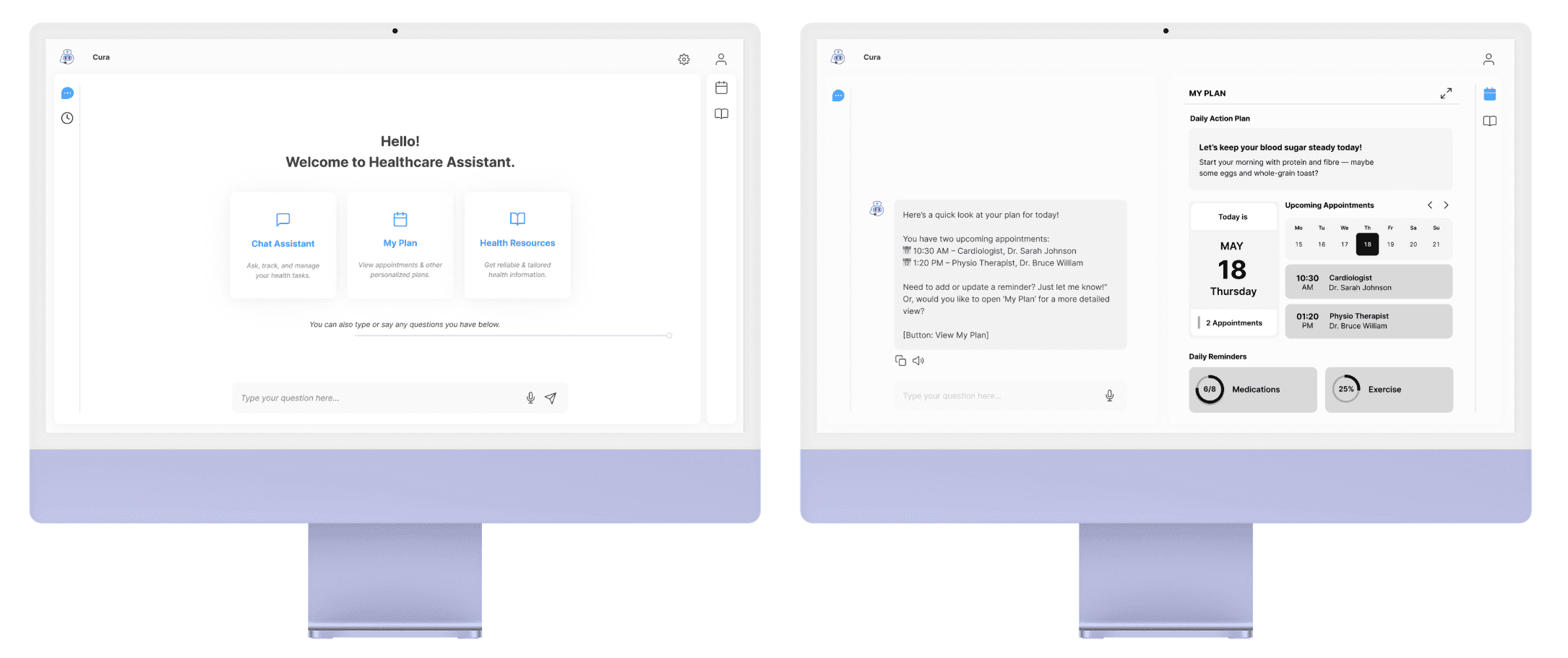
Example: The Three-Panel Design
Original design 👉
Real-time three-panel view showing the process on the Calendar or Medication, making edits transparent.
Frontend reality 👉
This requires complex state management, we can't implement in our timeline.
Compromise 🎉
Simplified to page link navigation. Users click to see AI reasoning on a separate page. Less elegant, but functional within constraints.
The Reality of 12 Weeks
We had 12 weeks to deliver a functional, safe, and accessible healthcare product. Every decision carried weight: technical complexity, safety stakes, and limited resources meant strategic choices over wishful thinking.
Framer is a design tool that allows you to design websites on a freeform canvas, and then publish them as websites with a single click.
Design-Dev Collaboration
Making It Real
Working on a local server meant designers couldn't see frontend progress in real-time. Small implementation inconsistencies accumulated, creating visual chaos. We established design walkthroughs in every 2 days to close the gap.
The Challenge
Framer is a design tool that allows you to design websites on a freeform canvas, and then publish them as websites with a single click.
The Solution: Design Walkthrough
Framer is a design tool that allows you to design websites on a freeform canvas, and then publish them as websites with a single click.
Example: The Three-Panel Design
Original design 👉
Real-time three-panel view showing the process on the Calendar or Medication, making edits transparent.
Frontend reality 👉
This requires complex state management, we can't implement in our timeline.
Compromise 🎉
Simplified to page link navigation. Users click to see AI reasoning on a separate page. Less elegant, but functional within constraints.
Testing Refined Solutions
Date: March 10, 2025
Participants: 15 participants (3 seniors aged 65+, 12 adults aged 20-40)
Method: Moderated usability testing with think-aloud protocol
Objective: Validate whether our accessibility improvements and new features met real user needs and remained comprehensible for our target senior demographic.

Quantitative Results
The Validation
Test 2 validated our accessibility-first approach across age groups:
For seniors: The system proved usable and trustworthy. Visual feedback, voice input, and Agent-lite eliminated critical barriers identified in Test 1.
For younger users: The simplified, conversational interface felt intuitive despite their higher digital literacy. This confirmed accessibility improvements benefit everyone, not just target users.
Success metric: Senior users with limited digital literacy independently completing real-world healthcare tasks with confidence, while younger users found the experience natural and efficient.
Navigation Ease Test 1: 3.7/5 → Test 2: 3.5/5
Framer is a design tool that allows you to design websites on a freeform canvas, and then publish them as websites with a single click.
Medication Management Test 2: 3.8/5 intuitiveness
Framer is a design tool that allows you to design websites on a freeform canvas, and then publish them as websites with a single click.
Voice Recognition Test 1: 4.0/5 → Test 2: 4.0/5
Framer is a design tool that allows you to design websites on a freeform canvas, and then publish them as websites with a single click.
What We Kept
Agent-lite Validation
Framer is a design tool that allows you to design websites on a freeform canvas, and then publish them as websites with a single click.
Voice as Primary Input
Framer is a design tool that allows you to design websites on a freeform canvas, and then publish them as websites with a single click.
What We Fixed
Test 1 revealed three critical issues: interaction uncertainty, readability barriers, and navigation collapse.
Eliminated Interaction Anxiety
Framer is a design tool that allows you to design websites on a freeform canvas, and then publish them as websites with a single click.
Resolved Readability Barriers
Framer is a design tool that allows you to design websites on a freeform canvas, and then publish them as websites with a single click.
Improved Navigation Confidence
Framer is a design tool that allows you to design websites on a freeform canvas, and then publish them as websites with a single click.
What Still Needs Work
Despite improvements, two challenges emerged for future development: conversational context memory in extended dialogues and a persistent manual data entry burden for seniors.
Context Memory Limitations
Framer is a design tool that allows you to design websites on a freeform canvas, and then publish them as websites with a single click.
Manual Input Burden
Framer is a design tool that allows you to design websites on a freeform canvas, and then publish them as websites with a single click.
Testing Refined Solutions
Date: March 10, 2025
Participants: 15 participants (3 seniors aged 65+, 12 adults aged 20-40)
Method: Moderated usability testing with think-aloud protocol
Objective: Validate whether our accessibility improvements and new features met real user needs and remained comprehensible for our target senior demographic.
Quantitative Results
The Validation
Test 2 validated our accessibility-first approach across age groups:
For seniors: The system proved usable and trustworthy. Visual feedback, voice input, and Agent-lite eliminated critical barriers identified in Test 1.
For younger users: The simplified, conversational interface felt intuitive despite their higher digital literacy. This confirmed accessibility improvements benefit everyone, not just target users.
Success metric: Senior users with limited digital literacy independently completing real-world healthcare tasks with confidence, while younger users found the experience natural and efficient.
Navigation Ease Test 1: 3.7/5 → Test 2: 3.5/5
Framer is a design tool that allows you to design websites on a freeform canvas, and then publish them as websites with a single click.
Medication Management Test 2: 3.8/5 intuitiveness
Framer is a design tool that allows you to design websites on a freeform canvas, and then publish them as websites with a single click.
Voice Recognition Test 1: 4.0/5 → Test 2: 4.0/5
Framer is a design tool that allows you to design websites on a freeform canvas, and then publish them as websites with a single click.
What We Kept
Agent-lite Validation
Framer is a design tool that allows you to design websites on a freeform canvas, and then publish them as websites with a single click.
Voice as Primary Input
Framer is a design tool that allows you to design websites on a freeform canvas, and then publish them as websites with a single click.
What We Fixed
Test 1 revealed three critical issues: interaction uncertainty, readability barriers, and navigation collapse.
Eliminated Interaction Anxiety
Framer is a design tool that allows you to design websites on a freeform canvas, and then publish them as websites with a single click.
Resolved Readability Barriers
Framer is a design tool that allows you to design websites on a freeform canvas, and then publish them as websites with a single click.
Improved Navigation Confidence
Framer is a design tool that allows you to design websites on a freeform canvas, and then publish them as websites with a single click.
What Still Needs Work
Despite improvements, two challenges emerged for future development: conversational context memory in extended dialogues and a persistent manual data entry burden for seniors.
Context Memory Limitations
Framer is a design tool that allows you to design websites on a freeform canvas, and then publish them as websites with a single click.
Manual Input Burden
Framer is a design tool that allows you to design websites on a freeform canvas, and then publish them as websites with a single click.